
Put a spacecraft on a loading screen and you’ve told players the theme. The rules? Could be anything.
Open one and you’re nursing a throttle, timing a burn, watching your neat circular orbit sag into a lopsided egg. Click the next link and that exact same ringed planet is just wallpaper behind a route-planning puzzle. Then there’s the one where rocks fly at you for ninety seconds and your ship handles like a shopping trolley on ice, and nobody involved cares one bit.
All three count as space-themed browser entertainment. They’re doing very different jobs, though, and that matters when someone who follows launch coverage clicks a link expecting to learn something. The realism of the rocket’s paint job is the wrong place to start. Better questions: what does the player actually control, what is the software really calculating, and what could anybody sensibly learn from the results?
A space setting isn’t a flight model
Setting is the paint and the backstory. The flight model is the math under the hood that decides how anything moves. Plenty of games have both. Plenty have gorgeous paint over very little math.
You’ll find games with a stunning Saturn where the ship still turns like a hatchback in a car park. Meanwhile a plain diagram with three sliders and a graph can teach you something genuinely important about how velocity and acceleration relate. Looks are cheap. Physics is expensive.
Kerbal Space Program is the obvious case of a game that took the physics seriously. Since its full release in 2015, it’s had a reputation among players and plenty of actual engineers for teaching orbital mechanics by letting you fail at them over and over. Even KSP simplifies, though. Only one planet or moon tugs on your ship at any moment in KSP. Real spacecraft feel a little of everything at once. For a game it’s a smart cheat, and most players never notice.
Questions worth asking any simulator
Good simulation-style experiences tell you what they’re assuming. Does the vehicle burn through propellant? Does it get lighter as it does? Is there gravity, and is there an atmosphere slowing things down? And when the game says “stable orbit” or “landed,” what did it actually check?
Nobody’s expecting a browser toy to simulate every valve on a Falcon 9. We’d just like to know where the corners were cut. Honestly, a tiny tool that admits its shortcuts beats a huge one that pretends it has none.
NASA Glenn’s Guide to Rockets is a nice model for this kind of thinking. Forces get their own pages there. Stability gets others, and so does control. Games could borrow that habit. An exercise can teach one relationship really clearly without pretending to be a full mission simulator. Tell us that’s the plan and we’re happy.
Remember the SpaceX docking simulator? It went up in 2020, right around the first crewed Dragon missions, and half the internet lost an afternoon to it. You inch a capsule toward the ISS with on-screen controls based on the real ones. Real physics engine? No, and it never said so. But try lining up that docking port at 0.2 meters per second without sweating.
Strategy is about choices, not orbits
In strategy games you’re usually juggling money, or trying to squeeze a whole mission into five moves. Its link to spaceflight may be all about planning, with very little trajectory math involved. Choosing which moon to visit first can make a great puzzle even if the travel times have been squashed down to keep things moving.
To judge one fairly, look at what you know before you commit. Ideally the price of a move shows up before you make it. Rules should arrive before the failure screen, not on it. And a restart button lets you try the other route, which is half the fun of any puzzle. Those questions describe how good the game is to play. None of them assume it’s forecasting the budget of a real mission.
NASA Space Place’s Explore Mars offers a concrete educational example. Kids pick a rock, then queue up rover moves to reach it, with an analyze command at the end. Get it right and you score points. Real rover teams do a grown-up version of that every day, writing a whole sol’s worth of commands in advance because Mars is far too far away to steer anything live. Is it driving Perseverance? Obviously not. It’s a decent first taste of why sequencing matters, though.
Casual play is allowed to just be fun
Plenty of short browser games are built around timing, spotting patterns, or one simple goal you understand the second you see it. The spaceship, the asteroid field or the purple planet in the background is just the set dressing. Asteroids has been doing exactly that since 1979, and nobody ever complained it got Newton wrong.
A game can be a perfectly good game without teaching anybody anything about engineering. That’s fine.
The description needs to match, though. “A quick space-themed challenge” promises something very different from “a spacecraft training simulator.” The first leaves room for whatever rules the designer fancies. The second invites hard questions about the physics and about what exactly you’re supposedly training for. Gorgeous artwork can’t answer those questions for the developer.
Space Place’s games collection shows how varied interactive science can be. It holds lots of separate activities, each with its own subject and instructions. So it’s worth looking at each one individually, instead of assuming every link in a space-themed collection offers the same kind of learning, or the same kind of play.
What “browser-based” actually tells you
Browser-based describes how you get to something. That’s all. It says nothing about the genre, how scientifically accurate the thing is, or who’s running the page. One browser tab might hold an educational model. The next might hold a strategy game, or a quick arcade blast. Same delivery, completely different purpose.
Modern web graphics have come a long way. MDN’s WebGL documentation describes an API for drawing 2D and 3D graphics in compatible browsers, using the device’s graphics hardware where it can. That’s how a page can now show an interactive spacecraft or a rotating planet without any old-school plug-in. NASA’s own Eyes on the Solar System runs in a browser and lets you ride along with real missions in 3D, which would have sounded absurd a couple of decades ago.
Better graphics don’t mean better physics
None of that means every device gets the same experience. The hardware matters, and so does the browser. A huge scene will strain a cheap phone that handles a simple one easily.
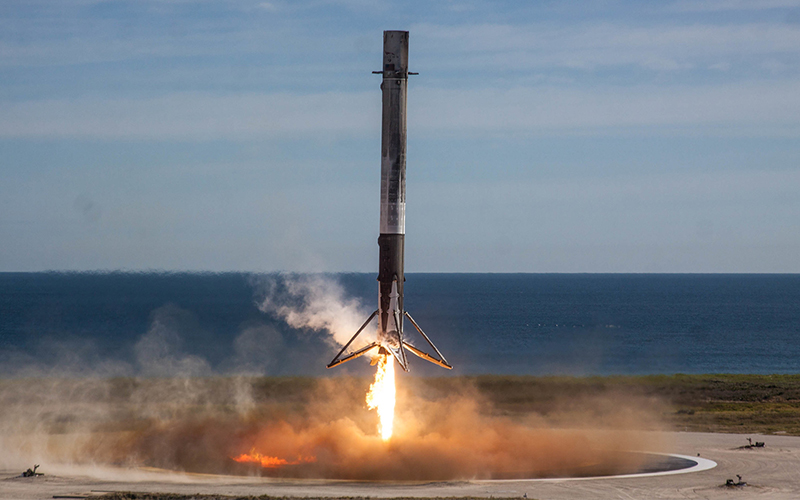
More importantly, a detailed 3D view doesn’t prove a better physical model than a flat 2D diagram. Presentation and calculation need judging separately, especially when a page calls itself educational. A pretty render of a booster landing tells you nothing about whether the descent underneath it was modeled honestly.
Controls decide whether you can actually play it
First, does it even work on your phone? A flight game built around WASD and the spacebar is close to unplayable on a touchscreen. Touch-first games have their own problems, like your thumb sitting right on top of the docking port you’re aiming for. A plain list of controls and a pause button you can find beat a thirty-second cinematic any day.
Under the hood, browsers offer the Pointer Events model, so a developer can treat a mouse click, a stylus and a fingertip in roughly the same way. Handy plumbing. It won’t design the game for them. Whether a first-timer can figure out the controls still comes down to somebody’s judgment.
Start with something harmless. Nudge the thrust. Does a gauge show the new setting? Tap a planet on the map and see whether it lights up before the game asks you to confirm. Little signals like that teach you the rules as you go. They also stop reviewers blaming a clunky menu on “difficulty.”
Tabbing away mid-mission
Your phone buzzes. You flip to WhatsApp for two minutes. Did your spacecraft just drift into the Sun? Good games tell you up front whether they freeze, keep going or try to reconnect. Coming back to a mission clock that kept running is a very different feeling from finding everything paused exactly where you left it.
There’s a browser feature for exactly this. MDN’s Page Visibility API documentation shows how a page notices it’s been hidden, then notices again when you’re back. Browsers throttle background tabs, too, so timers and animations slow to a crawl. Every game copes differently. Try it.
Saves
Then there’s the save file. Is there a save button you can actually see? Do you need an account to keep progress? Somewhere, the game should say where your hard work lives.
Plenty of browser games keep progress only in that one browser. Clear your history, swap laptops or come back after a few weeks, and your carefully built Mars colony may simply be gone. Worth checking before you sink a whole evening into one.
Say where the link goes
A good link describes the page a reader will land on. “Rocket flight simulator” should take you to something that models flight. “Space-themed browser games” should take you to games with that theme. A general digital entertainment platform is a much broader destination and should be described as one, not dressed up as an engineering reference.
That gives space publications a simple way to cover interactive media without drifting off their beat. Say how it works. Flag any learning claims. Be clear when something’s a demo and when it’s pure make-believe. And if you’re calling it a spaceflight game, the spaceflight should be in what you do, not just painted on the backdrop.
Pick for the reader
Who’s asking matters. A reader who wants to get how a Falcon 9 booster lands on a drone ship needs to see the model working, with real numbers on screen. Puzzle fans just want choices they can read and outcomes that feel fair. And someone grabbing ten minutes on a lunch break might just want a responsive game with a cool spaceship in it. Fair enough.
Say which of those you’re offering and everyone has a better time. Not every space game is a physics lesson. Most of them aren’t, and that’s fine, as long as nobody pretends otherwise.